DamageLensAI
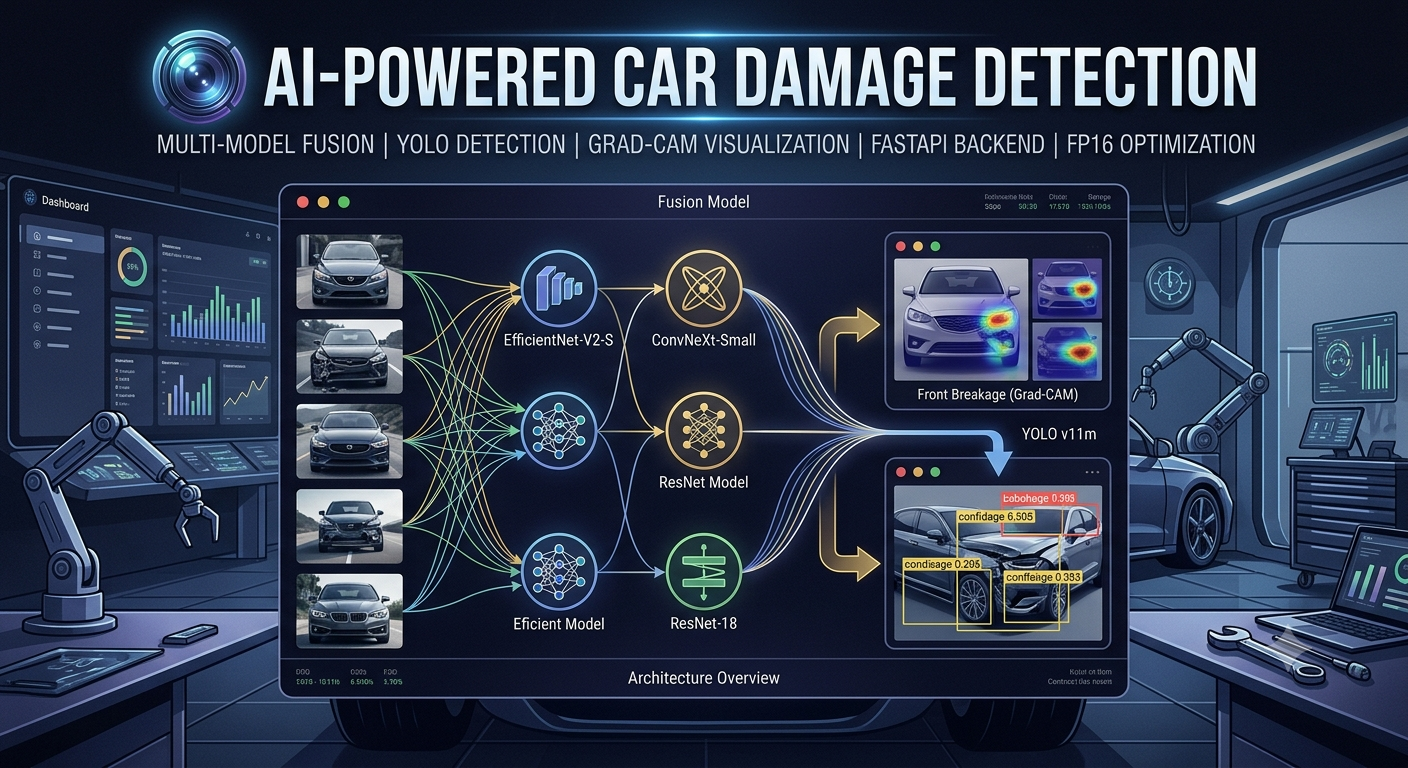
🚗 DamageLens: AI-Powered Car Damage Detection


🤖 The entire frontend (
DamageLensAI-Frontend/) was built with the help of AI.
⚠️ Important Notes
Cold Startup Time: The API may take 4-5 minutes on the first request to warm up the models. Subsequent predictions will be significantly faster.
APP LINK : APP
HF REPO : https://huggingface.co/spaces/junaid17/DamageLensAI/tree/main
📓 NOTEBOOKS : GitHub cannot render Jupyter Notebooks — view them directly on the HF repo: Notebooks on HuggingFace
🎬 APP DEMO : YouTube Demo Video
📋 Table of Contents
- Overview
- Features
- Model Performance
- ONNX Optimization & Benchmarks
- Dataset & Training
- Model Optimization
- Architecture
- CI Pipeline
- Setup & Installation
- Usage
- API Documentation
- Web UI Features
- Directory Structure
- Limitations & Known Issues
🎯 Overview
DamageLens is an advanced AI system for detecting and classifying car damage using multi-model fusion architecture. It combines the power of ResNet-18, EfficientNet-V2-S, and ConvNeXt-Small to achieve robust damage classification across vehicle front and rear sections.
The system can identify six damage categories:
- ✅ Front Normal / Front Breakage / Front Crushed
- ✅ Rear Normal / Rear Breakage / Rear Crushed
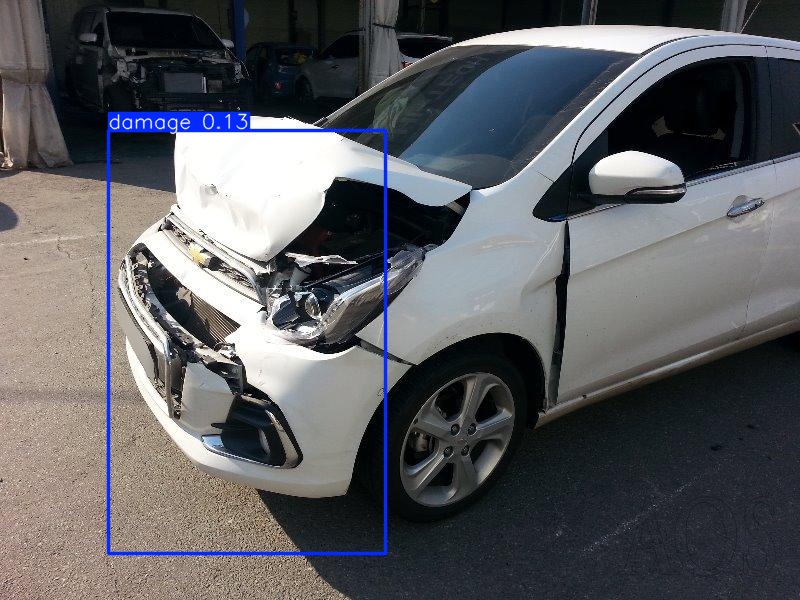
Additionally, it uses YOLO object detection to localize damage regions with bounding boxes.
✨ Features
| Feature | Description | |———|————-| | Dual Model Architecture | ResNet (lightweight) and Fusion (high-accuracy) options | | Grad-CAM Visualization | Understand which image regions drive predictions | | Real-time YOLO Detection | Localize damage with confidence scores | | FP16 Optimization | Reduced model size (258MB → 135MB) with minimal accuracy loss | | ONNX Export | All 3 models converted to FP16 ONNX for faster CPU inference (49–72% speedup) | | FastAPI Backend | High-performance REST API with async support | | Responsive Web UI | Modern, interactive web interface with real-time feedback | | Static File Serving | Efficient caching and delivery of results | | CI/CD Pipeline | Automated testing via GitHub Actions on every push/PR | | HuggingFace Integration | Models auto-downloaded from HF Hub on first startup |
📊 Model Performance
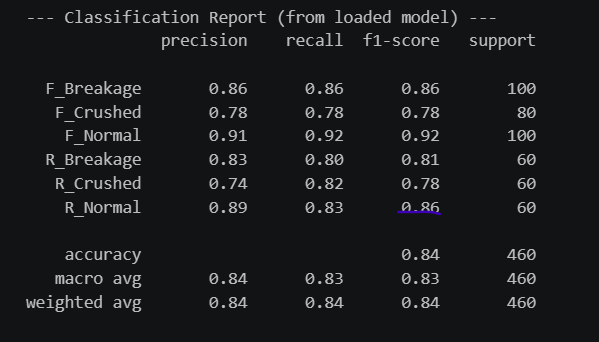
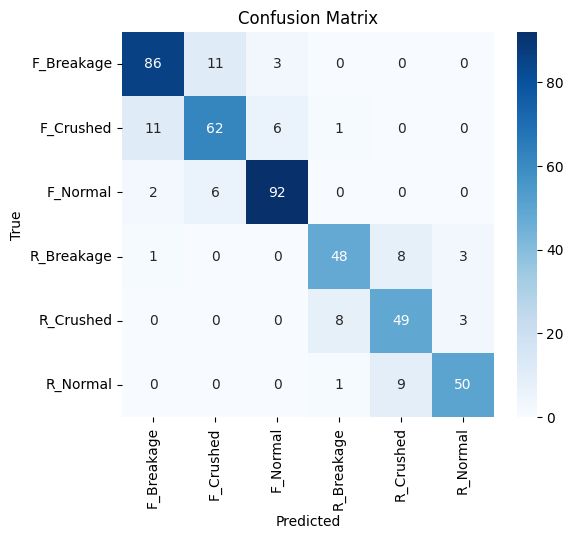
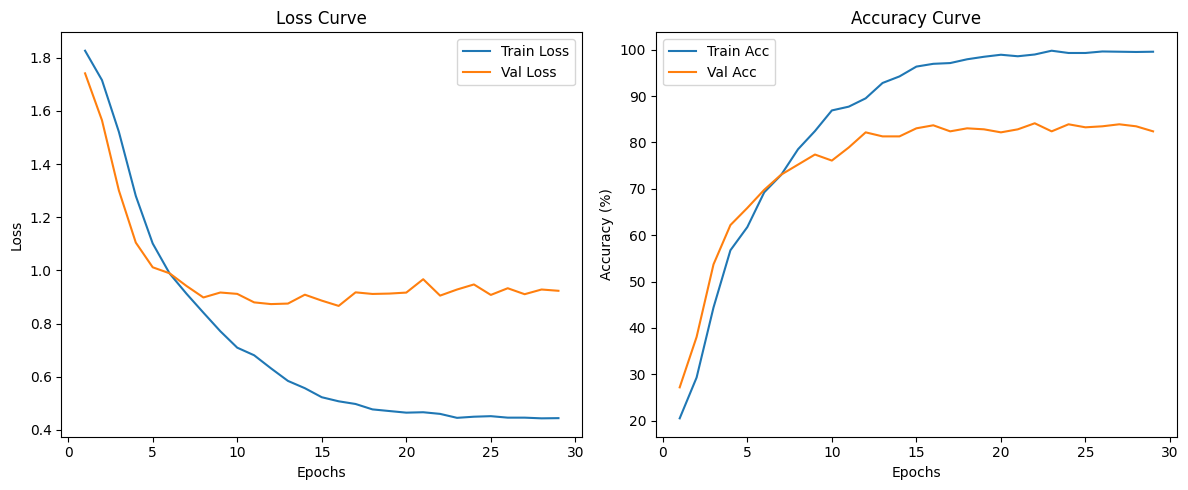
Fusion Model (High Accuracy — 84% Overall)
Classification Report:
Confusion Matrix:
Training Curves:
ResNet-18 (Lightweight — 77% Overall)
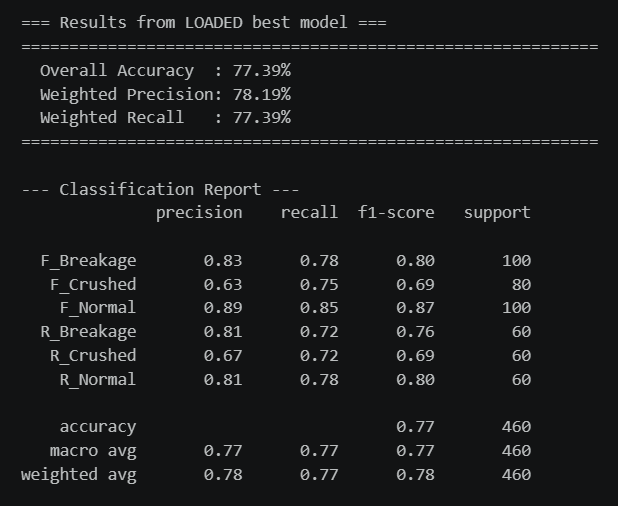
Classification Report:
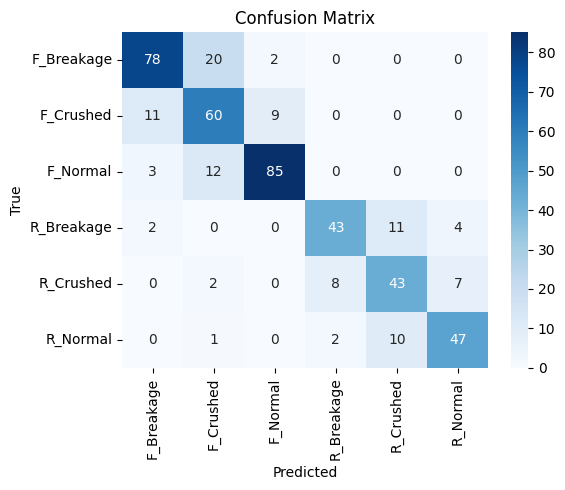
Confusion Matrix:
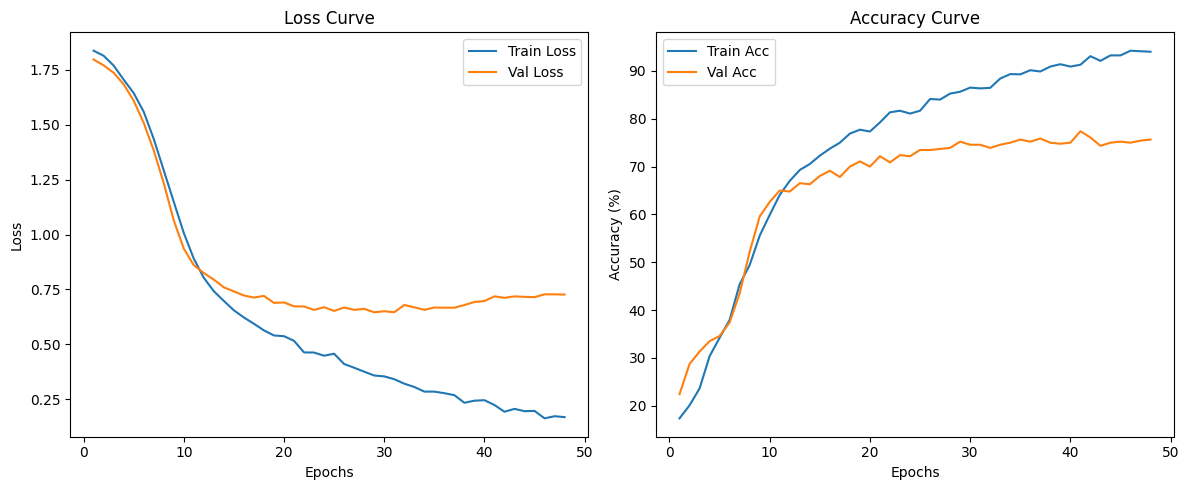
Training Curves:
YOLO Detection Results
⚡ ONNX Optimization & Benchmarks
All three models were exported to FP16 ONNX format and benchmarked against their PyTorch counterparts on 60 test images (CPU only). Results are from Models_Conversion/model_onnx_conversion.ipynb.
Fusion Model ONNX Benchmark
===========================================================================
                      BENCHMARK SUMMARY
===========================================================================
Total Images Evaluated  : 60
Prediction Match Rate   : 100.00% (60/60)
PyTorch Avg Latency     : 503.75 ms / image
ONNX Runtime Avg Latency: 219.87 ms / image
Performance Gain        : 56.35% faster with ONNX Runtime
===========================================================================
ResNet-18 ONNX Benchmark
===========================================================================
                      BENCHMARK SUMMARY
===========================================================================
Total Images Evaluated  : 60
Prediction Match Rate   : 100.00% (60/60)
PyTorch Avg Latency     : 55.68 ms / image
ONNX Runtime Avg Latency: 15.42 ms / image
Performance Gain        : 72.31% faster with ONNX Runtime
===========================================================================
YOLO v11m ONNX Benchmark
===========================================================================
                      BENCHMARK SUMMARY
===========================================================================
Total Images Evaluated  : 60
Detection Match Rate    : 100.00% (60/60)
PyTorch Avg Latency     : 1356.05 ms / image
ONNX Runtime Avg Latency: 680.31 ms / image
Performance Gain        : 49.83% faster with ONNX Runtime
===========================================================================
ONNX vs PyTorch Accuracy Parity
Evaluated on the full validation set (460 images) via Models_Conversion/base_vs_onnx_model_evaluation.ipynb. Both formats produce identical predictions.
Fusion Model (PyTorch = ONNX)
| Metric | Score |
|---|---|
| Accuracy | 84.13% |
| Precision | 83.64% |
| Recall | 83.42% |
| F1 Score | 83.48% |
ResNet-18 (PyTorch = ONNX)
| Metric | Score |
|---|---|
| Accuracy | 77.39% |
| Precision | 77.34% |
| Recall | 76.61% |
| F1 Score | 76.81% |
📚 Dataset & Training
Data Constraints
- Total Samples: ~1,800 images
- Train/Val Split: 80/20 (seed=42)
- Classes: 6 (F_Breakage, F_Crushed, F_Normal, R_Breakage, R_Crushed, R_Normal)
- YOLO subset: ~100 annotated images (train/val split)
Data Augmentation
| Transform | ResNet | Fusion | |———–|——–|——–| | Resize | 128×128 | 260×260 | | RandomHorizontalFlip | ✅ | ✅ | | RandomRotation | ±15° | ±10° | | ColorJitter (b/c/s) | ±20% | ±15% | | ImageNet Normalize | ✅ | ✅ |
Training Configuration
| Setting | ResNet | Fusion | |———|——–|——–| | Backbone | ResNet-18 | EfficientNet-V2-S + ConvNeXt-Small | | Frozen layers | All except layer3, layer4 | All except features[5,6,7] / stages[2,3] | | Optimizer | AdamW | AdamW (per-group LR) | | Loss | CrossEntropyLoss | CrossEntropyLoss (label_smoothing=0.1) | | Early stopping | patience=7 | patience=7 | | Input size | 128×128 | 260×260 (EfficientNet) / 224×224 (ConvNeXt) |
🔧 Model Optimization
FP16 Conversion (Fusion Model)
The Fusion model was saved in FP16 precision during training in the notebook (Notebooks/EfficientNet_ConvNext_Fusion.ipynb):
Original Model (FP32):     270 MB
Optimized Model (FP16):    135 MB
───────────────────────────────────
Compression Ratio:         50% reduction  ✅
Accuracy Loss:             < 1%           ⚠️
Speed Improvement:         ~1.3x faster  ⚡
The system auto-detects FP16 checkpoints at load time:
if first_tensor.dtype == torch.float16:
    model = model.half()
🏗️ Architecture
System Overview
┌──────────────────────────────────────────────────────┐
│           Frontend (React — DamageLensAI-Frontend/)  │
│  Dark Mode Glassmorphism  (Built with AI assistance) │
│  ├─ Drag & Drop Image Upload                         │
│  ├─ Model Selection (Fusion / ResNet)                │
│  └─ Real-time Result Tabs (Prediction/GradCAM/YOLO)  │
└───────────────────┬──────────────────────────────────┘
                    │ REST API (JSON)
┌───────────────────▼──────────────────────────────────┐
│              FastAPI Backend  (app.py)               │
│  ├─ POST /predict/resnet    → ResNet ONNX inference  │
│  ├─ POST /predict/fusion    → Fusion ONNX inference  │
│  ├─ POST /predict?mode=*    → Grad-CAM generation    │
│  └─ POST /predict/yolo      → YOLO ONNX detection    │
│                                                      │
│  Lifespan: models loaded once at startup             │
│  Static:   /static/uploads  /static/results          │
└──────┬───────────┬──────────────┬────────────────────┘
       │           │              │
┌──────▼──────┐ ┌──▼──────────┐ ┌▼─────────────┐
│ ResNet ONNX │ │ Fusion ONNX │ │ YOLO v11m    │
│  (77%)      │ │  (84%)      │ │ ONNX         │
│ Predictions │ │ Predictions │ │ Detection    │
└─────────────┘ └─────────────┘ └──────────────┘
       │
┌──────▼──────────────────────┐
│  Grad-CAM (PyTorch only)    │
│  ResNet .pt checkpoint      │
│  target: layer4[-1]         │
└─────────────────────────────┘
Model Loading (scripts/load_models.py)
Four models are downloaded from Hugging Face and initialized at startup. Three are served via ONNX Runtime for fast inference; the PyTorch ResNet .pt checkpoint is loaded exclusively for Grad-CAM.
Startup  (initialize_models)
  │
  ├─ resnet_onnx  → junaid17/car-damage-classifier  / car-damage-classifier.onnx
  │                  └─> ort.InferenceSession  (ResNet predictions)
  │
  ├─ fusion_onnx  → junaid17/best_fusion_model_fp16 / fusion_model.onnx
  │                  └─> ort.InferenceSession  (Fusion predictions)
  │
  ├─ yolo_onnx    → junaid17/Yolo_Model             / damage_detector.onnx
  │                  └─> YOLO(onnx_path, task="detect")  (YOLO detection)
  │
  └─ resnet_pt    → junaid17/car-damage-classifier  / car-damage-classifier.pt
                     └─> ResnetCarDamagePredictor(.pt)  ← Grad-CAM ONLY
Fusion Model (High Accuracy — 84%)
┌─────────────────────────────────────────────────────────────────┐
│                          INPUT IMAGE                            │
│                         (3, 260, 260)                           │
└────────────────┬────────────────────────────────┬──────────────┘
                 │                                │
         ┌───────▼────────┐             ┌─────────▼────────┐
         │ EfficientNet-  │             │  ConvNeXt-Small  │
         │ V2-S Backbone  │             │  Backbone        │
         │                │             │                  │
         │ Frozen except  │             │ Frozen except    │
         │ features[5,6,7]│             │ stages[2,3] +    │
         │ (unfrozen)     │             │ layernorm        │
         └───────┬────────┘             └─────────┬────────┘
                 │                                │
         ┌───────▼────────┐             ┌─────────▼────────┐
         │ AdaptiveAvg    │             │  Pooler Output   │
         │ Pool → Flatten │             │                  │
         └───────┬────────┘             └─────────┬────────┘
                 │  (1280,)                        │  (768,)
                 └──────────────┬─────────────────┘
                                │
                        ┌───────▼────────┐
                        │  CONCATENATE   │
                        │  1280 + 768    │
                        │  = (2048,)     │
                        └───────┬────────┘
                                │
                    ┌───────────▼───────────┐
                    │   FUSION HEAD         │
                    │  Dropout(0.4)         │
                    │  Linear(2048 → 512)   │
                    │  LayerNorm(512)       │
                    │  GELU()               │
                    │  Dropout(0.3)         │
                    │  Linear(512 → 256)    │
                    │  LayerNorm(256)       │
                    │  GELU()               │
                    │  Dropout(0.2)         │
                    │  Linear(256 → 6)      │
                    └───────────┬───────────┘
                                │
                        ┌───────▼────────┐
                        │ OUTPUT LOGITS  │
                        │  (6 classes)   │
                        └────────────────┘
Optimizer: AdamW with per-group learning rates
- EfficientNet features[5]: lr=1e-5
- EfficientNet features[6,7]: lr=3e-5
- ConvNeXt stages[2,3] + layernorm: lr=3e-5
- Fusion head: lr=1e-4
- Loss: CrossEntropyLoss with label_smoothing=0.1
- Early stopping patience: 7
ResNet-18 (Lightweight — 77%)
┌──────────────────────────────────┐
│      INPUT IMAGE                 │
│     (3, 128, 128)                │
└───────────────┬──────────────────┘
                │
        ┌───────▼─────────┐
        │   ResNet-18     │
        │   Backbone      │
        │                 │
        │  Frozen except  │
        │  layer3, layer4 │
        └───────┬─────────┘
                │  (512,)
        ┌───────▼─────────────────────┐
        │  Classification Head        │
        │  Dropout(0.5)               │
        │  Linear(512 → 256)          │
        │  ReLU()                     │
        │  Dropout(0.3)               │
        │  Linear(256 → 6 classes)    │
        └───────┬─────────────────────┘
                │
        ┌───────▼──────────┐
        │  OUTPUT LOGITS   │
        │  (6 classes)     │
        └──────────────────┘
Optimizer: AdamW with per-group learning rates
- layer3: lr=1e-5
- layer4: lr=1e-5
- fc head: lr=1e-4
- Loss: CrossEntropyLoss
- Early stopping patience: 7
YOLO v11m Integration
┌─────────────────────────────┐
│   INPUT IMAGE               │
│   imgsz=640, conf=0.05      │
└──────────────┬──────────────┘
               │
       ┌───────▼────────┐
       │  YOLO v11m     │
       │  Inference     │
       └───────┬────────┘
               │
    ┌──────────┴──────────┐
    │                     │
┌───▼───────┐      ┌──────▼──────┐
│ Bboxes    │      │ Confidence  │
│ (x1,y1,   │      │ Scores +    │
│  x2,y2)   │      │ Class Label │
└───┬───────┘      └──────┬──────┘
    └──────────┬──────────┘
               │
       ┌───────▼────────┐
       │ result.plot()  │
       │ Save to disk   │
       └────────────────┘
Grad-CAM Pipeline (scripts/gradcam.py)
Note: Grad-CAM uses only the PyTorch ResNet
.ptcheckpoint (resnet_pt). No ONNX model is involved — gradients cannot be computed through ONNX Runtime sessions.
Image Path
    │
    └─ ResNet PyTorch model  →  target_layer = model.layer4[-1]
    │
    ├─ Register forward hook  (_GradCAMHook)
    ├─ Forward pass → score.backward()
    ├─ acts [C,H,W]  ×  weights (mean of grads) → CAM [H,W]
    ├─ ReLU → normalize → resize to original dims
    └─ cv2.applyColorMap(COLORMAP_JET) → addWeighted overlay
Data Pipeline (src/data/)
Raw Images (data/dataset/)
    │
    ├─ ingestion.py   → scan folders, build file list
    ├─ preprocessing.py → validate / clean images
    ├─ augmentation.py  → train/val transforms
    │     ResNet:  Resize(128,128) + HFlip + Rotation(15°) + ColorJitter
    │     Fusion:  Resize(260,260) + HFlip + Rotation(10°) + ColorJitter
    └─ dataset.py   → ImageFolder DataLoaders
                       (train 80% / val 20%, seed=42)
ONNX Conversion & Export (Models_Conversion/)
PyTorch Checkpoints (HuggingFace Hub)
    │
    ├─ model_onnx_conversion.ipynb
    │     ├─ Load PyTorch model from HF Hub
    │     ├─ Export to ONNX (opset 17/18)
    │     ├─ Compress weights to FP16
    │     ├─ Upload ONNX back to HF Hub
    │     └─ Benchmark: PyTorch vs ONNX on 60 test images
    │
    ├─ base_vs_onnx_model_evaluation.ipynb
    │     └─ Evaluate PyTorch vs ONNX on full val set (460 images)
    │
    ├─ base_fusion_model.py    → FusionClassifier loader helper
    ├─ base_model_resnet.py    → ResNet loader helper
    └─ base_model_yolo.py      → YOLO loader helper

Uploaded ONNX models:
    junaid17/best_fusion_model_fp16  → fusion_model.onnx        (142 MB)
    junaid17/car-damage-classifier   → car-damage-classifier.onnx (22.6 MB)
    junaid17/Yolo_Model              → damage_detector.onnx      (48.5 MB)
🔁 CI Pipeline
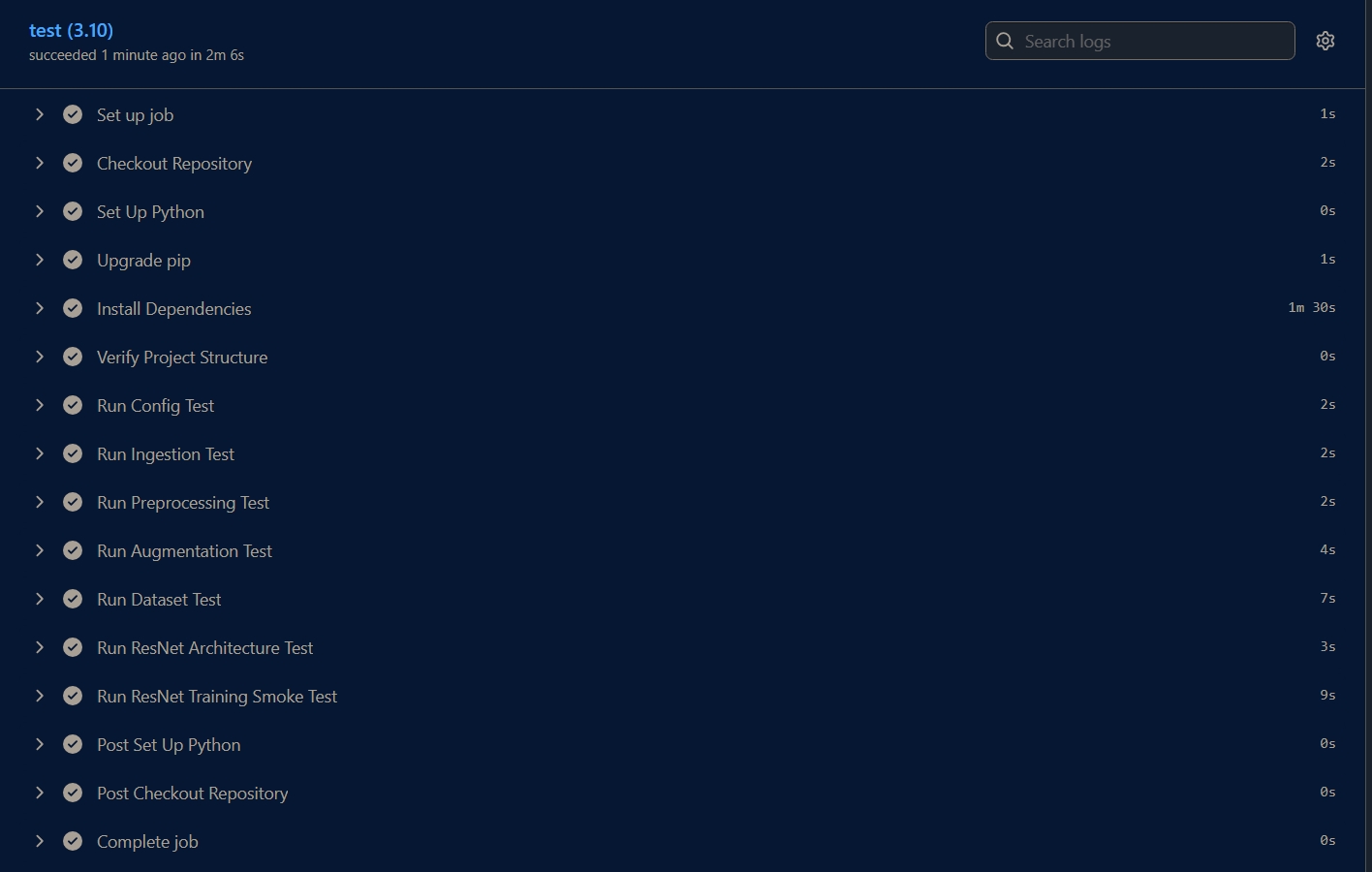
DamageLens uses GitHub Actions for continuous integration. Every push or pull request to main, master, or dev triggers the full test suite automatically.
CI Screenshot (GitHub Actions — All Tests Passing):
What the pipeline tests:
| Step | Test File | What it covers |
|——|———–|—————-|
| Config | test_config.py | Paths, constants, class map |
| Ingestion | test_ingestion.py | Dataset folder scanning |
| Preprocessing | test_preprocessing.py | Image validation & cleaning |
| Augmentation | test_augmentation.py | Transform pipelines |
| Dataset | test_dataset.py | DataLoader creation |
| ResNet Architecture | test_resnet_model.py | Model init & forward pass |
| Fusion Architecture | test_fusion_model.py | Fusion model init & forward pass |
| ResNet Training | test_train_resnet.py | Smoke test training loop |
| Fusion Training | test_train_fusion.py | Smoke test fusion training loop |
| YOLO Training | test_train_yolo.py | Smoke test YOLO fine-tuning |
Pipeline config (.github/workflows/ci.yaml):
- Runs on:
ubuntu-latest - Python:
3.10 - Triggers: push & PR to
main/master/dev
🚀 Setup & Installation
Prerequisites
- Python 3.11+
- CUDA 11.8+ (for GPU acceleration, optional but recommended)
- 8GB+ RAM (16GB recommended for Fusion model)
Installation Steps
# Clone the repository
git clone https://github.com/junaid17/damagelens.git
cd DamageLens

# Create virtual environment
python -m venv myvenv
source myvenv/bin/activate  # On Windows: myvenv\Scripts\activate

# Install dependencies
pip install -r requirements.txt

# Create required directories
mkdir -p static/uploads static/results checkpoints assets
Download Pre-trained Models
All models are automatically downloaded from Hugging Face on first startup via scripts/load_models.py. Three ONNX models are used for inference; the PyTorch .pt checkpoint is used exclusively for Grad-CAM:
| Key | File | Repo | Purpose |
|---|---|---|---|
resnet_onnx |
car-damage-classifier.onnx |
junaid17/car-damage-classifier |
ResNet predictions |
fusion_onnx |
fusion_model.onnx |
junaid17/best_fusion_model_fp16 |
Fusion predictions |
yolo_onnx |
damage_detector.onnx |
junaid17/Yolo_Model |
YOLO detection |
resnet_pt |
car-damage-classifier.pt |
junaid17/car-damage-classifier |
Grad-CAM only (PyTorch) |
💻 Usage
Running the FastAPI Server
uvicorn app:app --reload --host 127.0.0.1 --port 8000
Open your browser at http://127.0.0.1:8000
Quick Start:
- Upload a car image (JPG/PNG)
- Select analysis mode: Fusion (accurate) or ResNet (fast)
- Click “Run AI Analysis”
- View results in tabs: - 📊 Prediction: Confidence scores and probabilities - 👀 Grad-CAM: Visualize which regions influenced the prediction - 🎯 YOLO: Damage bounding boxes with confidence
Python API Example
import requests

with open('car_image.jpg', 'rb') as f:
    files = {'image': f}
    resp = requests.post('http://127.0.0.1:8000/predict/resnet', files=files)
    print(resp.json())

with open('car_image.jpg', 'rb') as f:
    files = {'image': f}
    resp = requests.post('http://127.0.0.1:8000/predict/fusion', files=files)
    print(resp.json())
📡 API Documentation
POST /predict/resnet
Content-Type: multipart/form-data
Body: image (File)

Response:
{
  "status": "success",
  "prediction": {
    "Rear Normal": 0.47,
    "Front Normal": 0.25,
    ...
  }
}
POST /predict/fusion
Content-Type: multipart/form-data
Body: image (File)

Response:
{
  "status": "success",
  "prediction": {
    "Rear Normal": 0.49,
    "Front Normal": 0.35,
    ...
  }
}
POST /predict?mode={resnet|fusion} — Grad-CAM
Grad-CAM always uses the PyTorch ResNet
.ptmodel regardless of themodeparameter. ONNX models do not support gradient computation.
Content-Type: multipart/form-data
Body: file (File), mode (String: "resnet" or "fusion")

Response:
{
  "status": "success",
  "mode": "resnet",
  "original_image": "/static/uploads/{uuid}_input.jpg",
  "selected_viz": "/static/results/{uuid}_gradcam.jpg",
  "resnet_viz": "/static/results/{uuid}_gradcam.jpg",
  "fusion_viz": null
}
POST /predict/yolo
Content-Type: multipart/form-data
Body: file (File)

Response:
{
  "status": "success",
  "original_image": "/static/uploads/{uuid}_input.jpg",
  "yolo_image": "/static/results/{uuid}_yolo.jpg",
  "detections": [
    { "label": "damage", "confidence": 0.87, "box": [x1, y1, x2, y2] }
  ],
  "total_detections": 2,
  "message": "Detections found"
}
🎨 Web UI Features
The frontend is a React application located in the DamageLensAI-Frontend/ folder.
- Dark mode glassmorphism design
- Drag & drop image upload
- Model selection dropdown (Fusion / ResNet)
- Real-time confidence bar animation
- Tab navigation: Prediction → Grad-CAM → YOLO
- Scan line effect during processing
- Plotly bar chart for class probabilities
- Side-by-side original vs heatmap comparison
🔍 Grad-CAM Visualization
Gradient-weighted Class Activation Mapping highlights which image regions most influenced the model’s prediction.
Original Image    +    Grad-CAM Heatmap    =    Overlay
                       Red   = High importance
                       Blue  = Low importance
- Uses PyTorch ResNet
.ptmodel only — hooks intolayer4[-1] - ONNX models are not used for Grad-CAM (no gradient support in ONNX Runtime)
📋 Directory Structure
DamageLens/
├── app.py                              # FastAPI app + all endpoints
├── requirements.txt
├── Dockerfile
├── README.md
│
├── .github/
│   └── workflows/
│       └── ci.yaml                     # GitHub Actions CI pipeline
│
├── assets/                             # README images
│   ├── fusion_classification_report.png
│   ├── fusion_confusion_matrix.png
│   ├── fusion_training_curves.png
│   ├── resnet_classification_report.png
│   ├── resnet_confusion_matrix.png
│   ├── resnet_training_curves.png
│   ├── yolo_detection_sample.jpg
│   └── ci_pipeline_passing.jpeg
│
├── DamageLensAI-Frontend/              # React frontend application
│   ├── public/
│   │   └── index.html
│   ├── src/
│   │   ├── api/
│   │   │   └── client.js
│   │   ├── components/
│   │   │   ├── AnalyzeButton.jsx
│   │   │   ├── ClassificationResult.jsx
│   │   │   ├── ErrorBanner.jsx
│   │   │   ├── GradCamResult.jsx
│   │   │   ├── Header.jsx
│   │   │   ├── ImageUploader.jsx
│   │   │   ├── ModelSelector.jsx
│   │   │   ├── ResultTabs.jsx
│   │   │   └── YoloResult.jsx
│   │   ├── App.jsx
│   │   ├── index.css
│   │   └── index.js
│   ├── package.json
│   └── README.md
│
├── Models_Conversion/                  # ONNX conversion & evaluation
│   ├── model_onnx_conversion.ipynb     # Export PyTorch → FP16 ONNX + benchmark
│   ├── base_vs_onnx_model_evaluation.ipynb  # PyTorch vs ONNX accuracy parity
│   ├── base_fusion_model.py            # Fusion model loader helper
│   ├── base_model_resnet.py            # ResNet loader helper
│   └── base_model_yolo.py              # YOLO loader helper
│
├── scripts/
│   ├── prediction_helper.py            # ResNet + Fusion model classes & inference
│   ├── gradcam.py                      # Grad-CAM (ResNet + Fusion, CPU-optimized)
│   ├── load_models.py                  # HF Hub download + model initialization
│   └── yolo_predict.py                 # YOLO inference + bbox drawing
│
├── src/
│   ├── config.py                       # Paths, hyperparams, class map
│   ├── data/
│   │   ├── ingestion.py                # Dataset folder scanning
│   │   ├── preprocessing.py            # Image validation
│   │   ├── augmentation.py             # Train/val transforms
│   │   └── dataset.py                  # DataLoader creation
│   ├── models/
│   │   ├── resnet_model.py             # CarClassifierResNet
│   │   └── fusion_model.py             # FusionClassifier
│   └── training/
│       ├── trainer.py                  # Generic train loop (single + dual input)
│       ├── train_resnet.py             # ResNet training entry point
│       ├── train_fusion.py             # Fusion training entry point
│       └── train_yolo.py               # YOLO fine-tuning
│
│
├── Notebooks/
│   ├── Resnet18_fine_tuning_final.ipynb
│   ├── EfficientNet_ConvNext_Fusion.ipynb
│   └── damage_detector_yolo.ipynb
│
├── test/
│   ├── test_config.py
│   ├── test_ingestion.py
│   ├── test_preprocessing.py
│   ├── test_augmentation.py
│   ├── test_dataset.py
│   ├── test_resnet_model.py
│   ├── test_fusion_model.py
│   ├── test_train_resnet.py
│   ├── test_train_fusion.py
│   └── test_train_yolo.py
│
├── data/
│   ├── dataset/                        # 6-class image folders
│   │   ├── F_Breakage/
│   │   ├── F_Crushed/
│   │   ├── F_Normal/
│   │   ├── R_Breakage/
│   │   ├── R_Crushed/
│   │   └── R_Normal/
│   └── yolo/                           # YOLO annotated subset
│       ├── train/images + labels/
│       ├── val/images + labels/
│       └── dataset_custom.yaml
│
├── test_images/                        # 60 images used for ONNX benchmarking
│
└── static/
    ├── uploads/                        # Temp uploaded images
    └── results/                        # Generated Grad-CAM / YOLO outputs
⚠️ Limitations & Known Issues
Data Constraints
- Limited Training Data: ~1,800 samples — may show variance on edge cases
- Class Imbalance: Rear Crushed class has fewer samples, affecting recall
Performance
| Metric | Value | Note | |——–|——-|——| | ResNet Inference | - | Fast, lower accuracy | | Fusion Inference | - | Accurate, computationally heavy | | Cold Startup | 4-5 min | HF Hub download + model warmup | | ResNet Accuracy | 77% | Lightweight trade-off | | Fusion Accuracy | 84% | Best accuracy |
Technical Limitations
- Fusion accuracy is 7% higher than ResNet (84% vs 77%)
- YOLO model may miss small or partially occluded damage
- Grad-CAM is for diagnostic/explainability purposes only
- Batch processing not currently supported
- FP16 Grad-CAM on CPU requires automatic FP32 cast (handled internally)